DNSao

DNSao is a high-performance multi-upstream DNS forwarder
- DNS Sinkhole: blocks domains based on lists, acting as a DNS sinkhole, preventing access to unwanted content, invasive advertising, and hindering trackers
- DNS over TLS and DNS over HTTPS Support: performs queries to upstream servers using traditional UDP, DoT and DoH, ensuring greater privacy in resolutions
- Parallel Querying to Multiple Upstreams: can be configured to send the same query to multiple upstream servers in parallel and returns the fastest response, reducing browsing latency
- Multiple protocol as server: responds for UDP, TCP and HTTP dns queries, enabling different client setups
- High-Performance Cache: stores responses respecting their original TTL, includes negative caching, and a rewarm (pre-heating) mechanism to keep frequently used entries always available
- DNSSEC-Aware Policies: requests DNSSEC data from upstream resolvers and applies configurable policies (off/simple/rigid) based on the AD flag
- YAML Configuration: all server configuration is centralized in a single .yaml file, easy to version and replicate across multiple instances for high availability
- Local DNS Mapping: allows defining local domain resolutions for specific IPs — ideal for homelabs, self-hosting, and internal networks
- Metrics Dashboard: provides a metrics dashboard to monitor operation and performance
- Low Resource Usage: runs comfortably with 256 MB of RAM, even on older hardware or compact devices
- Free and Open Source: free software, openly maintained on GitHub, allowing unrestricted auditing and use
- Stateless Runtime: does not rely on databases or peripheral systems, enabling fast cold starts
- Low Number of Dependencies: only 5 — dnsjava, logback, javalin, minimal-json, and snakeyaml
Purpose
Other DNS software acts as a DNS Sinkhole, or supports multiple DoT upstreams, or performs recursive DNS resolution, but it’s always necessary to combine solutions to achieve a satisfactory level of privacy or speed. DNSao exists to be the only DNS tool your network needs.
All source code is available on the project’s GitHub, including the latest releases and development documentation.
Screenshots
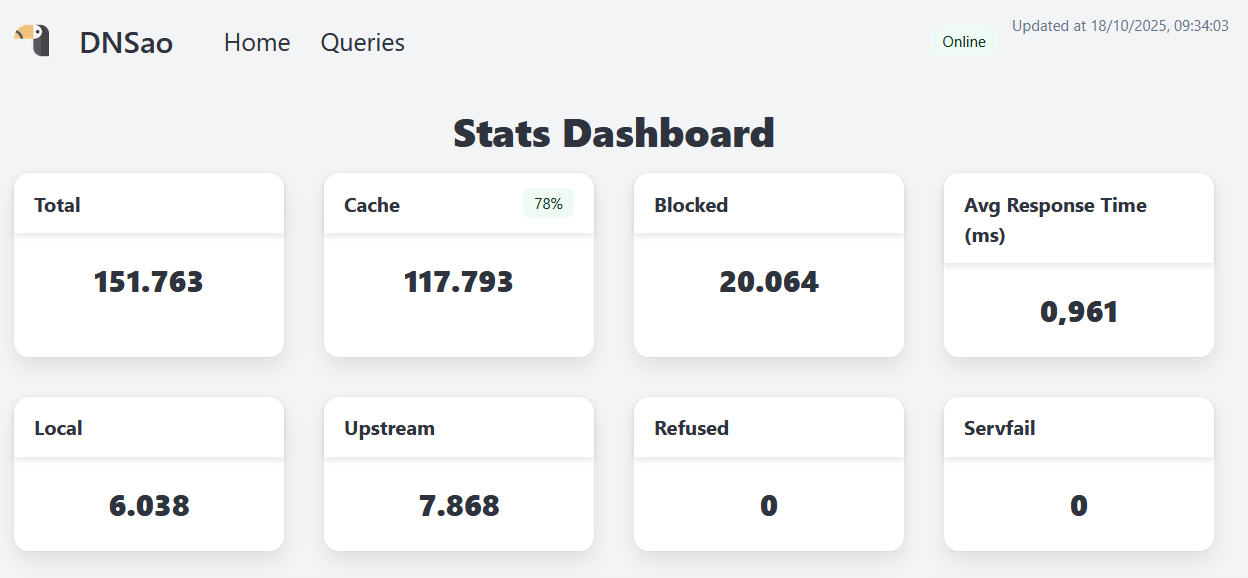
Query Summary
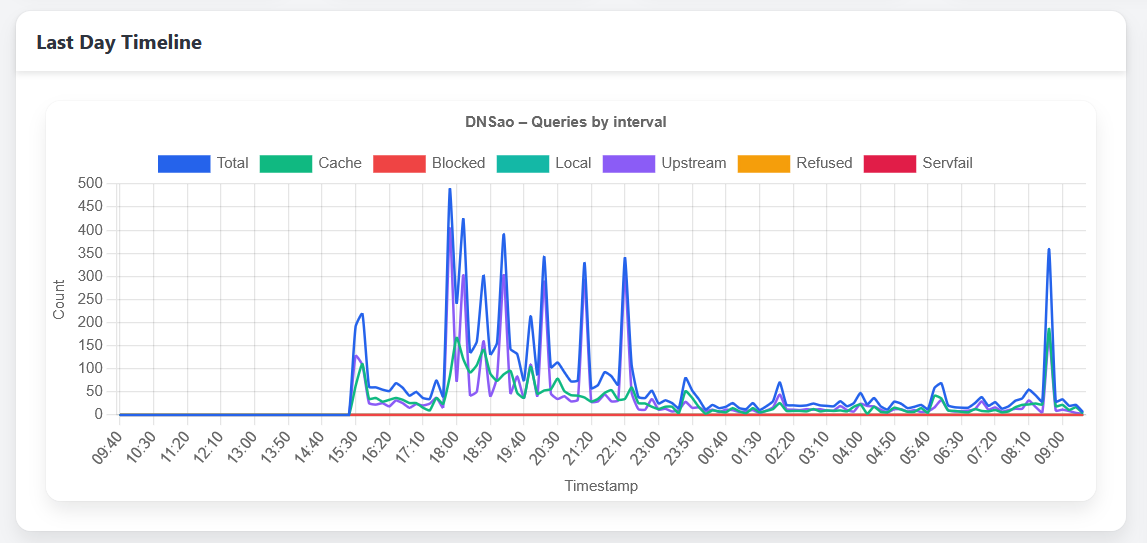
Graph with queries timeline
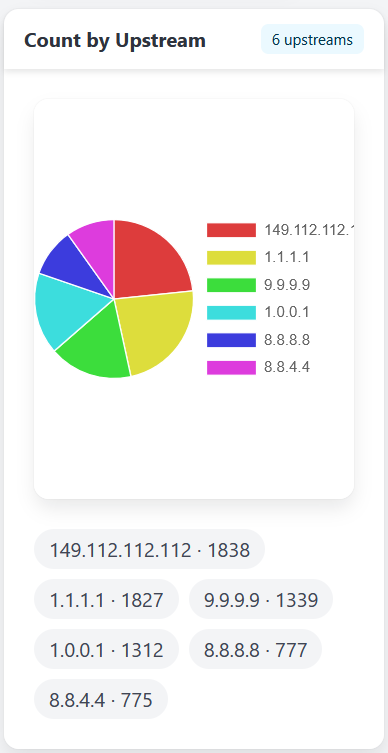
Upstream distribution
Benchmarks
DNS benchmarks can be somewhat unfair, because after the innitial burst and all domains are properly cached, it is just an exercise of how fast the cpu can get something from memory and wrap it correctly to return, but some people might find it necessary, so here is a couple of tests using dnsperf and a list of 250 domains.
First on in a LXC running with a single core of a recent cpu (i5-12400), where 10000 queries per second results in a perfect score:
avital@texugo:~/temp$ dnsperf -s dnsao1.intranet -d domains.txt -l 1200 -Q 10000
DNS Performance Testing Tool
Version 2.14.0

[Status] Command line: dnsperf -s dnsao1.intranet -d domains.txt -l 1200 -Q 10000
[Status] Sending queries (to 192.168.68.128:53)
[Status] Started at: Sat Oct 25 10:30:23 2025
[Status] Stopping after 1200.000000 seconds
[Status] Testing complete (time limit)

Statistics:

  Queries sent:         11997016
  Queries completed:    11997016 (100.00%)
  Queries lost:         0 (0.00%)

  Response codes:       NOERROR 10993096 (91.63%), NXDOMAIN 1003920 (8.37%)
  Average packet size:  request 30, response 267
  Run time (s):         1200.000091
  Queries per second:   9997.512575

  Average Latency (s):  0.000414 (min 0.000093, max 0.503841)
  Latency StdDev (s):   0.001498
And this one in a raspberry pi 3, with the same domains.txt list. When reaching 100 queries per second, it starts to show it's limits:
avital@texugo:~/temp$ dnsperf -s dnsao2.intranet -d domains.txt -l 1200 -Q 50
DNS Performance Testing Tool
Version 2.14.0

[Status] Command line: dnsperf -s dnsao2.intranet -d domains.txt -l 1200 -Q 50
[Status] Sending queries (to 192.168.15.50:53)
[Status] Started at: Sat Oct 25 12:28:45 2025
[Status] Stopping after 1200.000000 seconds
[Status] Testing complete (time limit)

Statistics:

  Queries sent:         60000
  Queries completed:    60000 (100.00%)
  Queries lost:         0 (0.00%)

  Response codes:       NOERROR 51968 (86.61%), NXDOMAIN 8032 (13.39%)
  Average packet size:  request 30, response 297
  Run time (s):         1200.000098
  Queries per second:   49.999996

  Average Latency (s):  0.004377 (min 0.001777, max 0.258354)
  Latency StdDev (s):   0.004117


avital@texugo:~/temp$ dnsperf -s dnsao2.intranet -d domains.txt -l 1200 -Q 100
DNS Performance Testing Tool
Version 2.14.0

[Status] Command line: dnsperf -s dnsao2.intranet -d domains.txt -l 1200 -Q 100
[Status] Sending queries (to 192.168.15.50:53)
[Status] Started at: Sat Oct 25 12:54:28 2025
[Status] Stopping after 1200.000000 seconds
Warning: received a response with an unexpected (maybe timed out) id: 24603
[Timeout] Query timed out: msg id 24602
[Timeout] Query timed out: msg id 11636
[Status] Testing complete (time limit)

Statistics:

  Queries sent:         120000
  Queries completed:    119998 (100.00%)
  Queries lost:         2 (0.00%)

  Response codes:       NOERROR 103934 (86.61%), NXDOMAIN 16064 (13.39%)
  Average packet size:  request 30, response 276
  Run time (s):         1200.000090
  Queries per second:   99.998326

  Average Latency (s):  0.004140 (min 0.001823, max 0.184822)
  Latency StdDev (s):   0.002594